Find a roll-call vote
A roll call is a vote in which each member's answer is recorded by name. The Votes page lists the roll calls of the current Congress, for both the House and the Senate, newest first, with the result, the tally and how each party voted.
#Use the Votes page
-
Open Votes in the row of Politics sections.
-
Choose House or Senate, or leave it on Both chambers.
-
Choose what to show: All votes, On bills, Party-line or Failed.
-
To look for a particular vote, type words in the box, for example
appropriationsornomination, and select Find.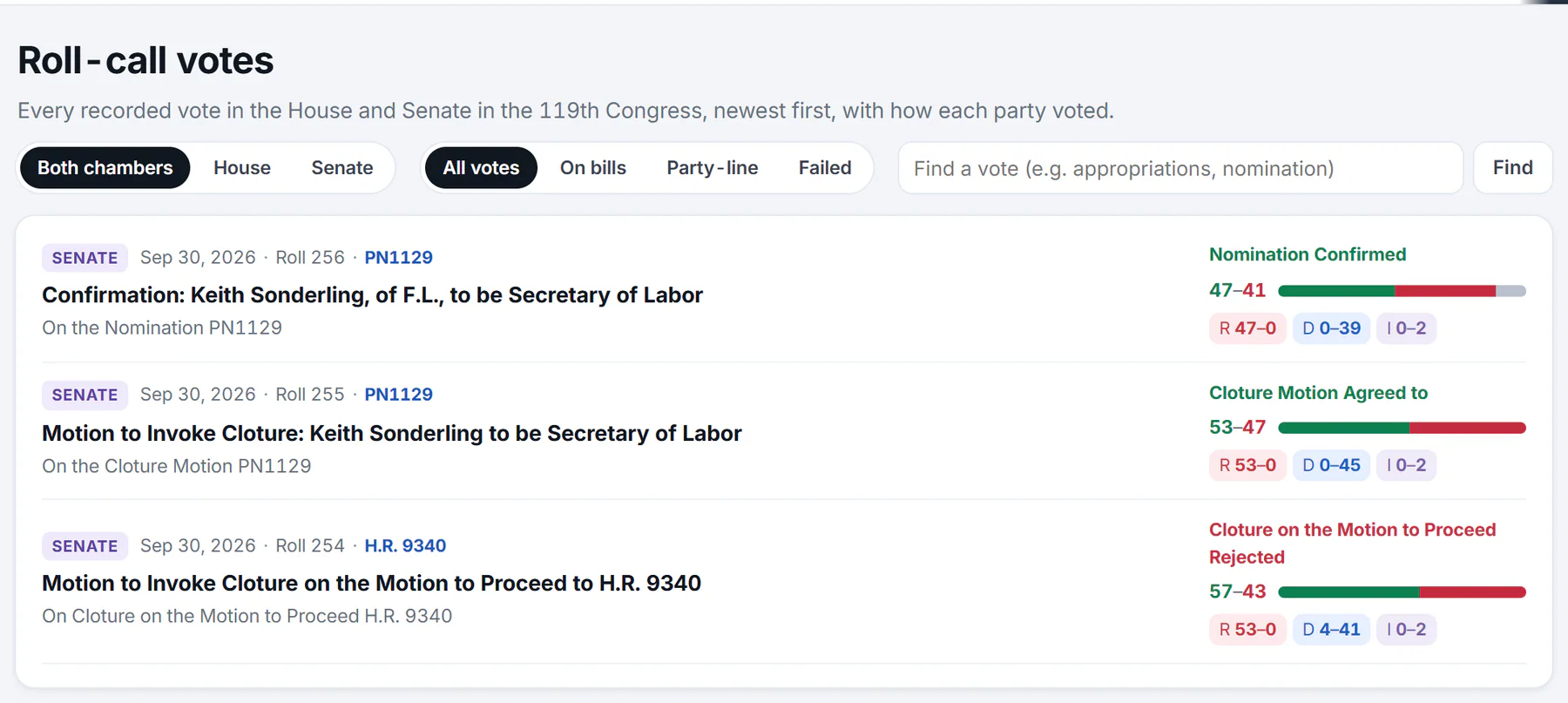
The Votes page. Each row shows the chamber, date and roll number, what was decided, the result, a bar of yeas and nays, and each party's split.
- 1House, Senate or both
- 2All votes, votes on bills, party-line votes or failed votes
- 3Find a vote by words
- 4Chamber, date, roll number and the bill
- 5The result
- 6How each party voted
-
Select a vote's title to open the vote page.
#Read a row
Each row packs in the facts you need to size up a vote:
- The first line: the chamber (House or Senate), the date, the roll number, and, when the vote was on a bill or resolution, a link to that bill. A vote on a nomination shows the nomination's number.
- The title is what the vote was about. Under it, a smaller line gives the exact question put to the members.
- The result is the House Clerk's or the Senate's own wording, such as Passed, Failed, Rejected, Agreed to or Confirmed. Passing results show in green and failing ones in red.
- The tally, for example 47–41, counts yeas first and nays second. The bar beside it divides the chamber into yeas (green), nays (red) and the members who answered Present or did not vote.
- The party split shows each party's yeas and nays, as
R 47–0for Republicans,D 0–39for Democrats andI 0–2for independents.
#What the filters mean
| Filter | What it shows |
|---|---|
| On bills | Votes tied to a bill or resolution, which leaves out votes on nominations and other business. |
| Party-line | Votes where most Republicans and most Democrats voted on opposite sides. |
| Failed | Votes whose result is a failure, such as Failed or Rejected. |
The page lists 30 votes at a time. Select Older at the bottom to go back further.
#Common questions
Why is the newest vote weeks old?
The House and Senate hold recorded votes only while they are in session. During a recess there are no new ones. The overview says when each chamber last voted, and new roll calls appear within about ten minutes of the House Clerk or the Senate publishing them.
What does "Party-line" mean here?
A vote counts as party-line when most Republicans voted one way and most Democrats voted the other. The page does not mean that every member of a party voted together.
Why do the yeas and nays not add up to every member?
Members who answered Present or did not vote are not in the tally. The vote page shows those counts too.
Can I find a vote from last year?
Yes, if it was in the current Congress. The list reaches back to its start in January 2025. Votes from earlier Congresses are not on Politics.
How do I find the vote on a particular bill?
Open the bill's page. Its Roll-call votes card lists the votes taken on it. See Read a bill's page.